Welcome to my Football Manager Blog, the main purpose of this blog is to provide updates on the status of my Football Manager Skins & Guides Website

If you have any questions or queries then I can generally be found in the Skinning Forum at the Official Sports Interactive Forums, though I'd ask you to open a new thread rather than sending me a message.

To help with navigation I have included indexes of my content for the last few versions of Football Manager in the tabs below.
Showing posts with label football Manager 2016. Show all posts

Friday, 26 February 2016

FM16 Guide - How to Enable Rotating Default Backgrounds


First of all credit for this goes to ArtDekDok, he's just asked me to type up this guide as he isn't a native English Speaker.

This may be of interest to some people, ArtDekDok has found an interesting way to get the game to rotate through a list of default backgrounds instead of you being stuck with the same background.

Easiest way to show this is with a quick video:

Thursday, 19 November 2015

FM16 Match Screen Kits Mod


My latest Match Screen Mod for Football Manager 2016 is another update from FM15 with this one changing the logos on the match screens into kits, and is available in two versions:

Mod 1 - Replaces all Match Screen Logos with Kits this affects Logos shown on the Split Screen Overview Panel and in the Header.

Mod 2 - Just replaces the Logos with Kits on the Split Screen Overview Panel but leaves the Logos in the Header.

You can also get the teamnames to appear on the titlebar (third screenshot below) by downloading Mod 1 of this mod and my Match Titlebar Team Name Mod.


Mod 1 should worth with any FM16 skin including Touch mode skins.

Mod 2 should also work with any FM16 full-mode skin, though if you are using a skin with a custom match titlebar you'll need to modify the files yourself.

If you are using a Touch Mode Skin then just download Mod 1 as the extra file in Mod 2 isn't used in FMT.

Note that these mods don't add kits/logos to the various Overview screens that don't display logos by default it just changes the existing logos to kits.

---
Redistribution Terms
You are free to post this content to your website provided:
1. It is not sold or behind a paywall.
2. You don't advertise it as being exclusive to your website.
3. My username and blog address are included: http://michaeltmurrayuk.blogspot.co.uk/

Saturday, 14 November 2015

FM16 Guide - How To Stop the Blurring Effect


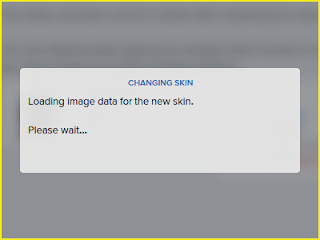
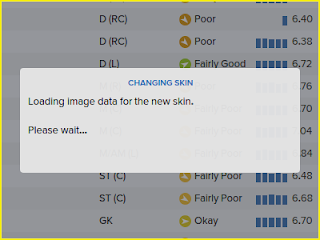
A new feature in Football Manager 2016 is a blurring effect that displays when the main screen isn't in focus (i.e. when processing, saving or responding to a popup), however if you don't like this effect then it is simple enough to disable.

The first thing you need to do is extract a couple of the default game files, if you don't know how to do this see this guide.

If you are using a Full Mode Skin then you want to extract the contents of this folder:

\skins\fm-widgets\graphics\boxes\dialog\background

If you are using one of the Touch Mode Skins then you want to extract the contents of this folder:

\skins\fmc\graphics\boxes\dialog\background

If you are using the default skins then you can download the relevant Base Skin which saves you having to extract the files as I have included them with the Base Skins.

Inside these folders will be a paper.xml file if you open this you will see the following line:

<boolean id="blurred" value="true"/>

To disable the blurring all you need to do is change true to false:

<boolean id="blurred" value="false"/>

Then save the file and if FM16 is running reload your skin and the blurring should now be gone.


On the left is an example of the blur enabled as default whilst the right image is with the blurring disabled.

---
Redistribution Terms

You are free to post this content to your website provided:

1. It is not sold or behind a paywall.
2. You don't advertise it as being exclusive to your website.
3. My username and blog address are included: http://michaeltmurrayuk.blogspot.co.uk/